Create/Edit Event – Invites
From the Invites tab you can send invites for your event. The number of emails you can send per event is
currently restricted to 150.
Here is why: schedulR works best for all parties involved (issuer, investor, admin) if investors only receive
invites that are relevant to them, otherwise they will either unsubscribe (we cannot send any more invites) or
they will not open our emails anymore. If they do not open it, they will not book electronically, and you will
have to do more manual follow-ups. We put a lot of efforts into filters, which can be adjusted by the investors
at any time. However, filtering is not perfect and probably never can be. So, as an issuer you should aim ideally
to only send invites to investors whom you know, have met or a certain that they might be interested. Clearly,
you can also invite investors you do not know for which the filtering, the job-title and the investor profile
indicate that they might be interested. Large-scale fishing expeditions however will harm the platform and are
not GDPR compliant. That is why we have restricted the number of invites to 150 per event (for now).
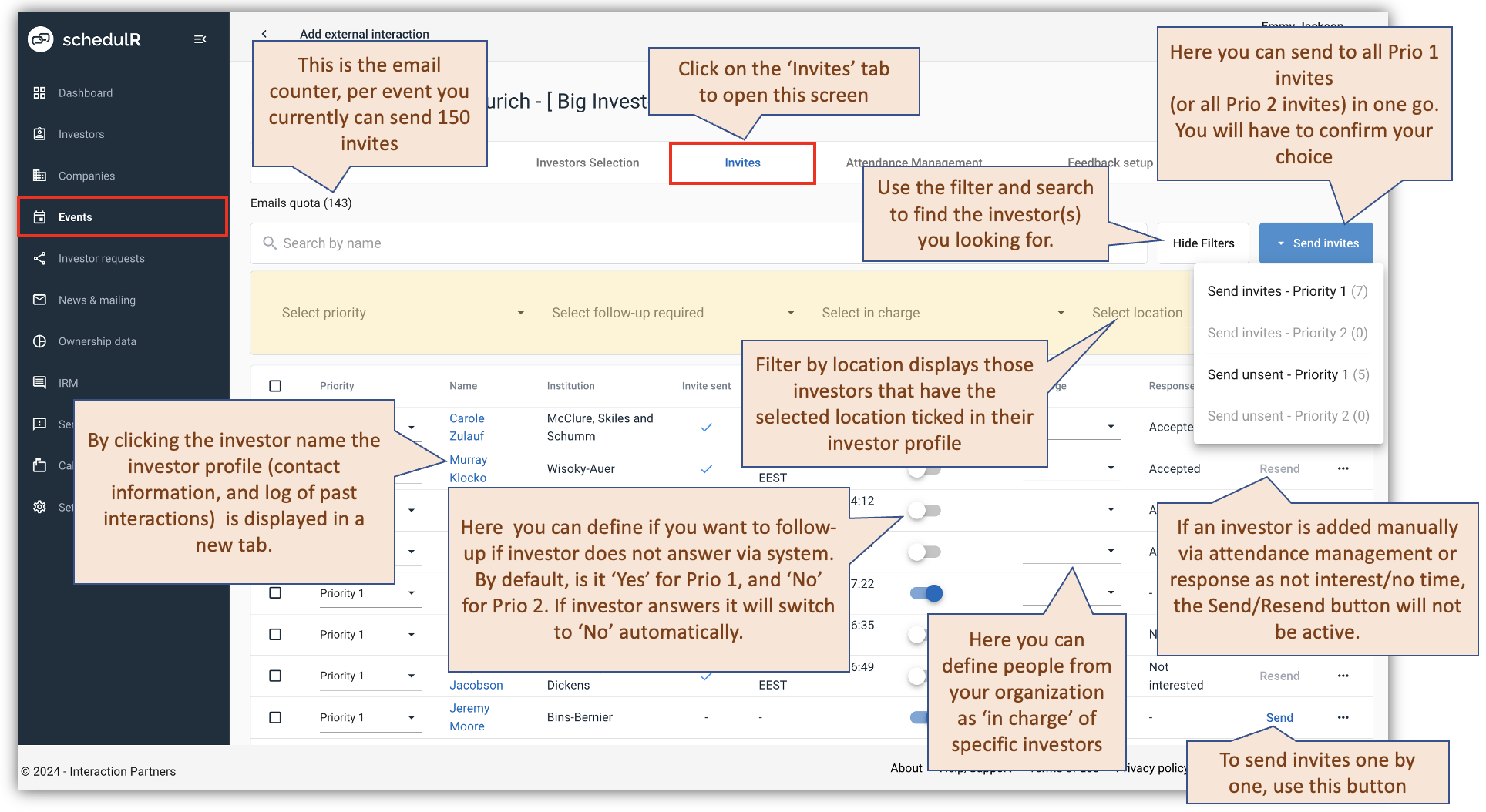 Figure 7.14 – Create/Edit Event – Invites
Best Practice - How to do invites & follow-ups: You are a valued software client not the least because you like
the workflows we have built and integrated into the platform. But some processes cannot be completely
standardized: Invites and follow-ups are one of those. This is how we do it (our best practice):
-
Send yourself a test email: It is a good idea to set up yourself as an investor (ideally hidden, i.e. only visible
to your company) with a second email, e.g. your private email, or a team email, so colleagues can check as
well). You will then always add yourself to the invites tab and send a test email to yourself to see how it
looks. Ideally you use different browsers for your corporate log-in and the investor log in. Otherwise, you
will most likely run into error messages, It might also be a good idea to book yourself into a slot to see if
that works as well. Subsequently delete yourself from the slot again via ‘Attendance Management’ (see Create/Edit Event – Attendance Management for details). Example for invite email below.
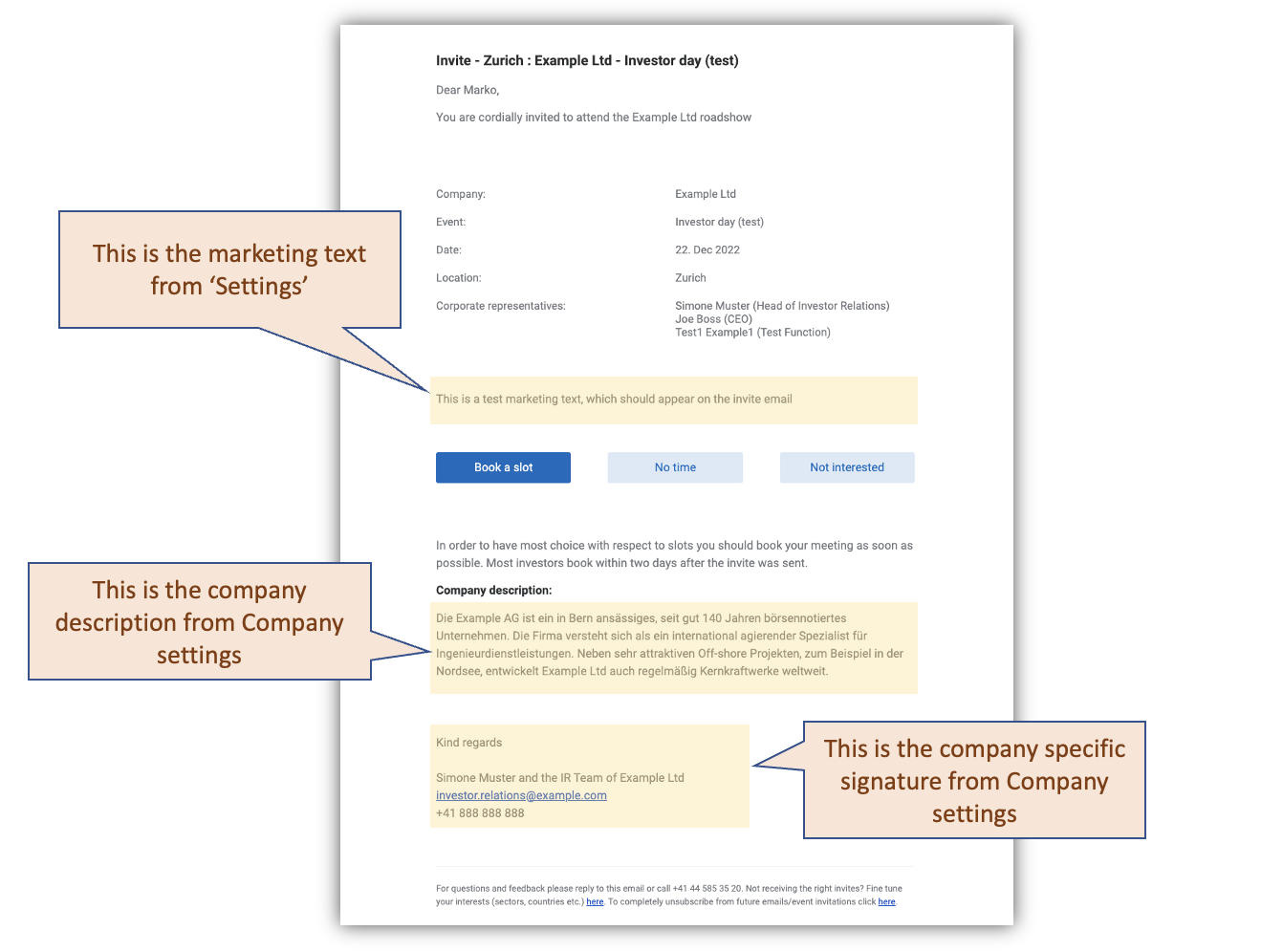 Figure 7.15 – Create/Edit Event - Invites - Email
-
Send staggered invites: Send Prio 1 invites (to investors who usually do 1:1s) about one week before Prio 2
invites. Before sending Prio 2 invites make sure you have reached out to your most important Prio 1
investors. -
Log interactions: Log all your interactions in the IRM. A call is so much easier if you know when you called
last or had another interaction. We made logging easy for schedulR. If you click on the invite screen on
‘View’ you will get the contact information if you click ‘Log’ you will only get a list of last interactions. If
you click ‘Add External’ from one of those pages the form will be pre-filled with the name of the
respective investor. -
Create to-do lists: This is especially valuable if there are several people involved in follow-up calls, but
even if you are a one-man (or woman) show you might find the filtering helpful. For example, filtering for
‘Prio 1’ and ‘Follow-up Yes’ will give you a list of all those Prio 1 whom you have not reached yet. If you are
then consistent and log your interactions and update the ‘follow-up’ status manually (change the switch to
‘No’ by clicking on it) your list will be updated (and shorter), next time you pull it. -
Follow up with customized links: If you want to follow up with a personal email, or via Bloomberg Chat,
WhatsApp (or other messenger apps) you can use personalized 1-click booking links. The link will allow the
recipient to directly book a slot for him for that event (without login).
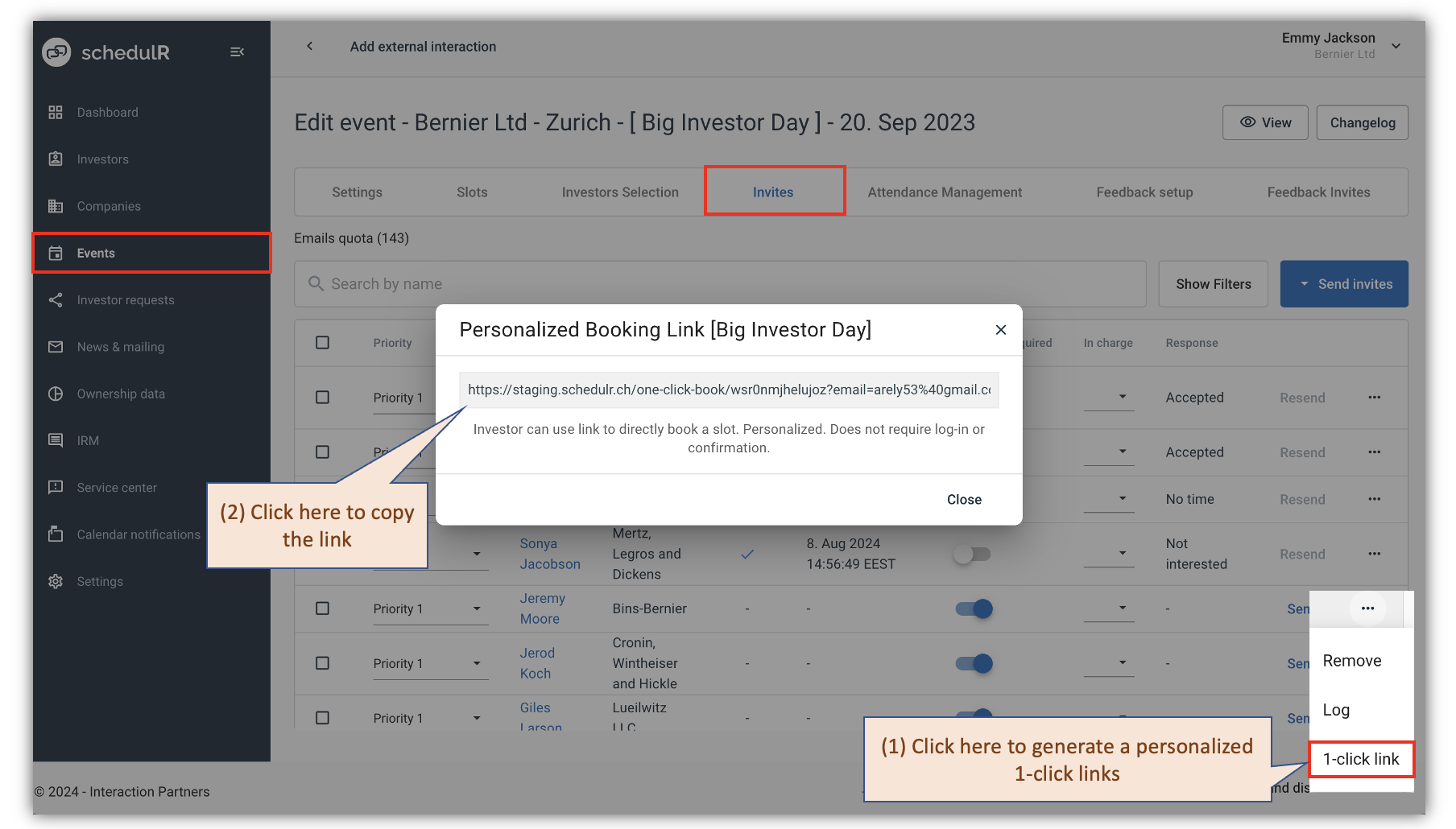 Figure 7.16 – Create/Edit Event - Invites – 1-click-booking