Filter linked investors and export search results
Filtering your ‘Linked Investors’ and downloading the results is easy. See below, or if you prefer a short video
see here.
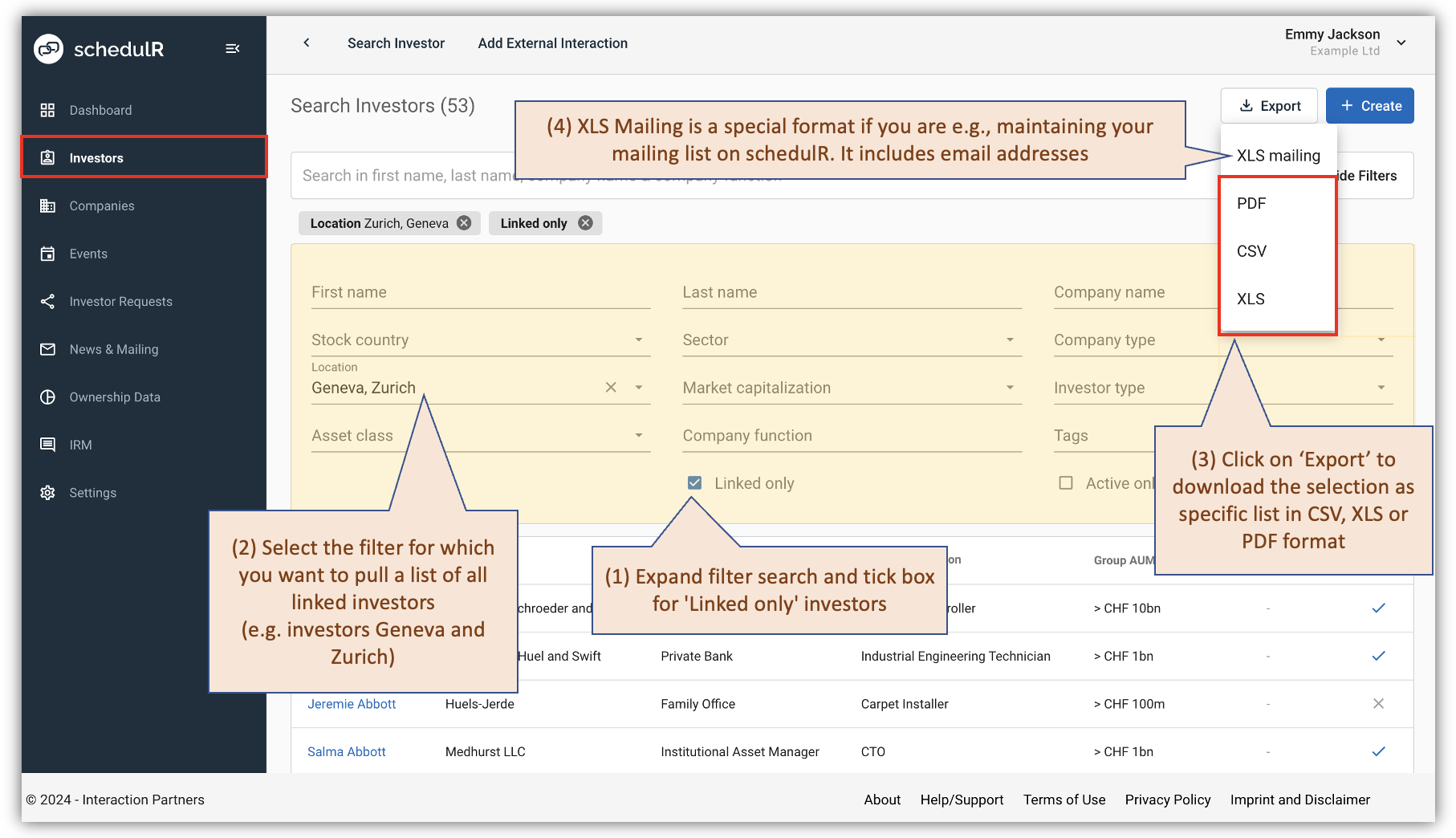 Figure 5.10 – Pull linked investors by location
Once you have filtered your linked investors e.g. by location you can download the selection (first name, last
name, company) as PDF, CSV or XLS. Also, in CSV and XLS file you will see number of logged interactions of any
user, interactions dates, and links to all investors’ profiles
 Figure 5.11 – View columns in XLS export
There are a number of interesting use cases related to filtering your ‘Linked Investors’ and downloading the
results
Use case 1 – Provide target investors per location to third party: Pulling a list of linked investors by location is
useful because it allows you to provide a third party (a broker or an IR firm) with a list of investors you have
met or want to meet in specific locations.
Use case 2 – You are co-organizing an event with a broker e.g. in Geneva. With the downloaded list in XLS is
easier to coordinate who invites which investors.